mist – collaborative Markdown editor

Mist is an online collaborative Markdown editor, with comment support. Downside: documents live for 99 hours.

author
Matt Webb (https://interconnected.org)
website
mist
github
inanimate-tech/mist
posts
curl https://mist.inanimate.tech/new -T file.md
md-publish-file function

Wrap that into md-publish-file Elisp function, interactively picking the file.

Here's an md-publish-file function that uploads a Markdown file to mist:

(defun md-publish-file (file)
  "Upload FILE to mist.inanimate.tech and return the URL.
Interactively, prompt for a Markdown file."
  (interactive
   (list (read-file-name "Markdown file to publish: "
                         nil nil t nil
                         (lambda (name)
                           (string-match-p "\\.md\\'" name)))))
  (unless (file-exists-p file)
    (user-error "File does not exist: %s" file))
  (let* ((output (shell-command-to-string
                  (format "curl -s https://mist.inanimate.tech/new -T %s"
                          (shell-quote-argument (expand-file-name file)))))
         (url (string-trim output)))
    (if (string-match-p "^https://mist\\.inanimate\\.tech/" url)
        (progn
          (kill-new url)
          (message "Published to: %s (copied to kill ring)" url)
          url)
      (error "Upload failed: %s" output))))

This function:

  • Prompts for a .md file interactively
  • Uploads it using curl
  • Copies the URL to the kill ring
  • Returns and displays the URL

Vincent Van Gogh gallery

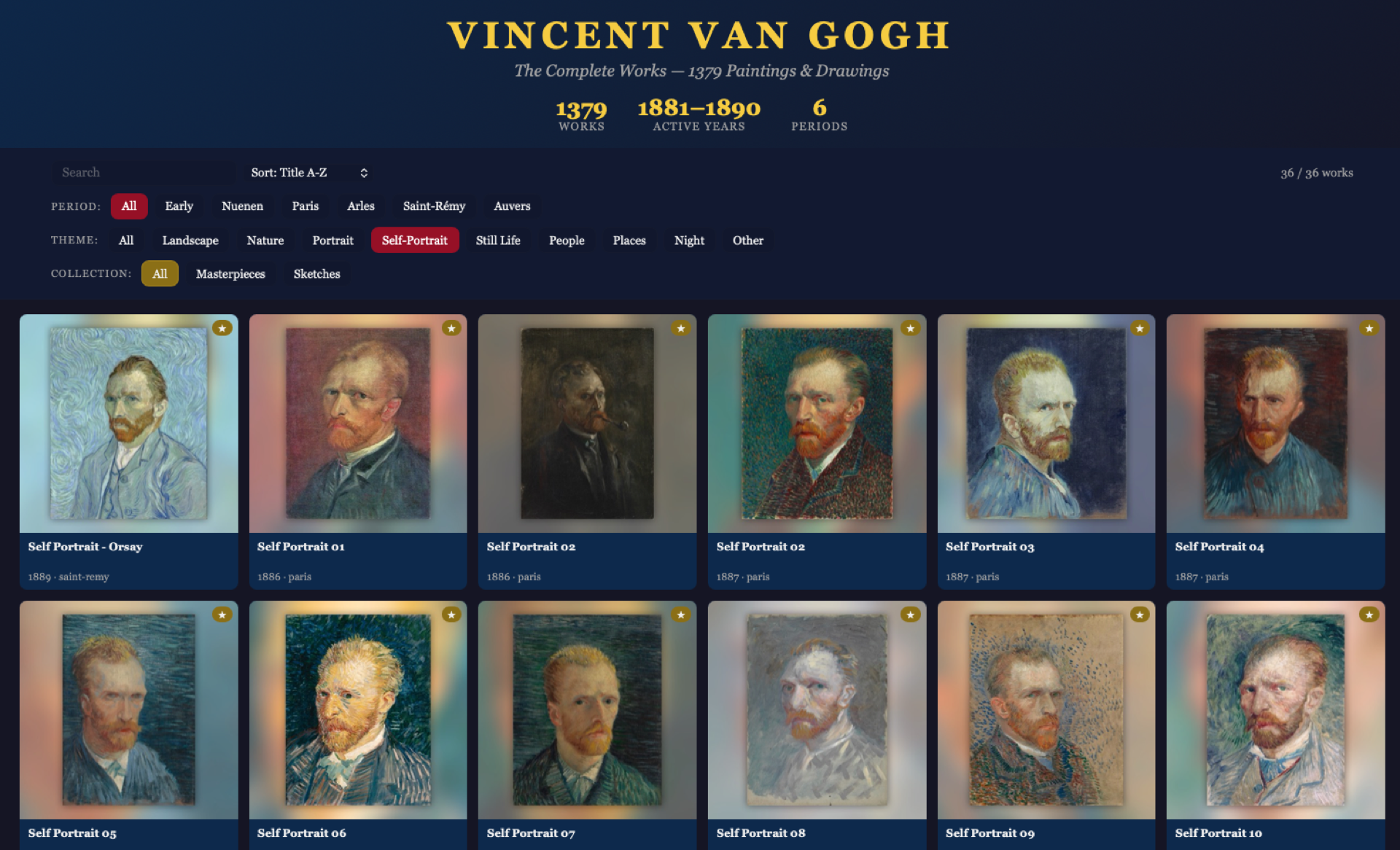
I found on my external drive a collection of Vincent Van Gogh paintings, that I converted into desktop wallpapers using Backgroundifier app (archagon/backgroundifier-public) several years ago.

The collection is pretty big, 1380 paintings. To explore it in a better way than just going through files on a disk, I built an interactive gallery (a small project using Claude Code). It serves images directly from my external drive; also had to prepare thumbnails for faster loading.

Check it out here: https://hotter.myaddr.dev/van-gogh/, not bad for couple hours of work, don't you think?

260503--van-gogh-gallery__screenshot.png

M-s and M-g prefixes in Emacs   

· :Blog:

Let's talk about two semantic and useful prefixes in GNU Emacs - M-s and M-g. Semantics is there - M-s is for "search", M-g is for "go".

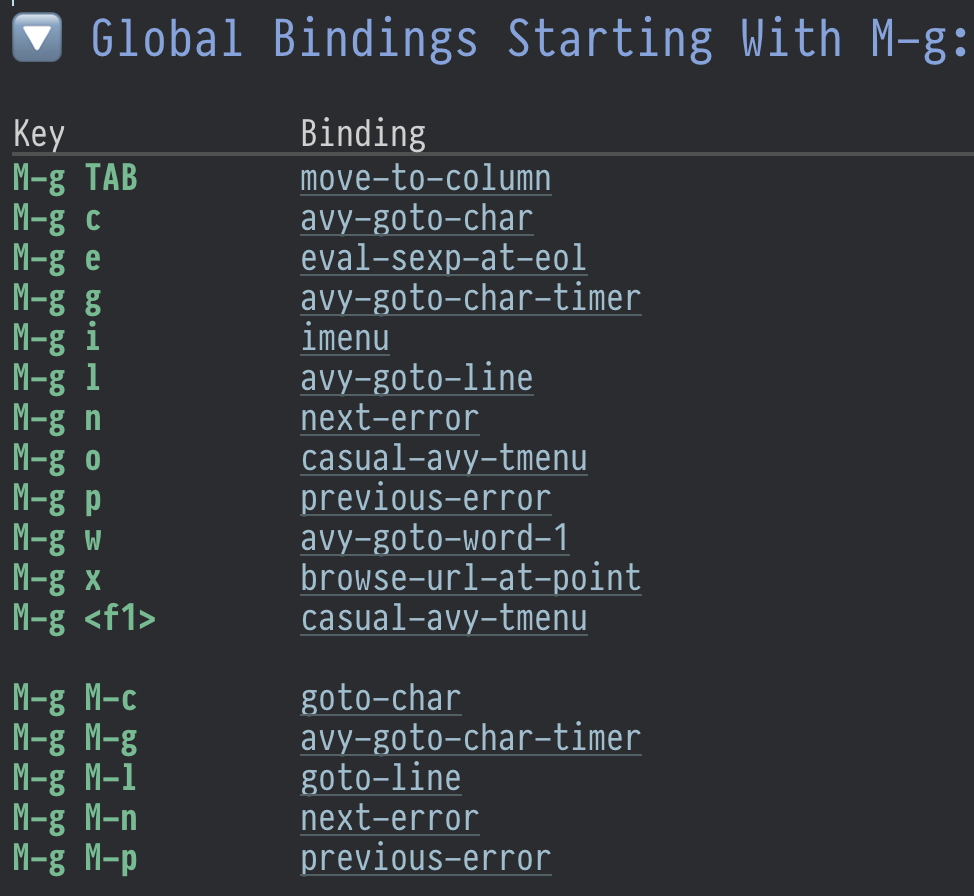
M-g is for Go
M-g l
go to line
M-g c
go to char
M-g g
go go go
M-g M-g
also "go go go", for convenience, hold Alt and press g g twice.
M-g w
go to word, asks for the first character of a word and jumps there.
M-g C-h
I ran out of remembering keybindings, so this one is list all of them – add C-h after any prefix and Emacs will show you the help. No need to use which-key unless necessary, you're in control - you'll memorise things only looking first into memory, if missing - take action to learn (and thus remember). which-key is a false friend for new Emacser, beware!

Checking the keymap, we see many aliases like M-g M-g, so M-g M-c, M-g M-l, M-g M-n and so on, they are for mnemonical convenience.

Most of movements run avy, which can do anything, it's an awesome way of arbitrary movements and beyond.

m-g-prefix-in-emacs.png
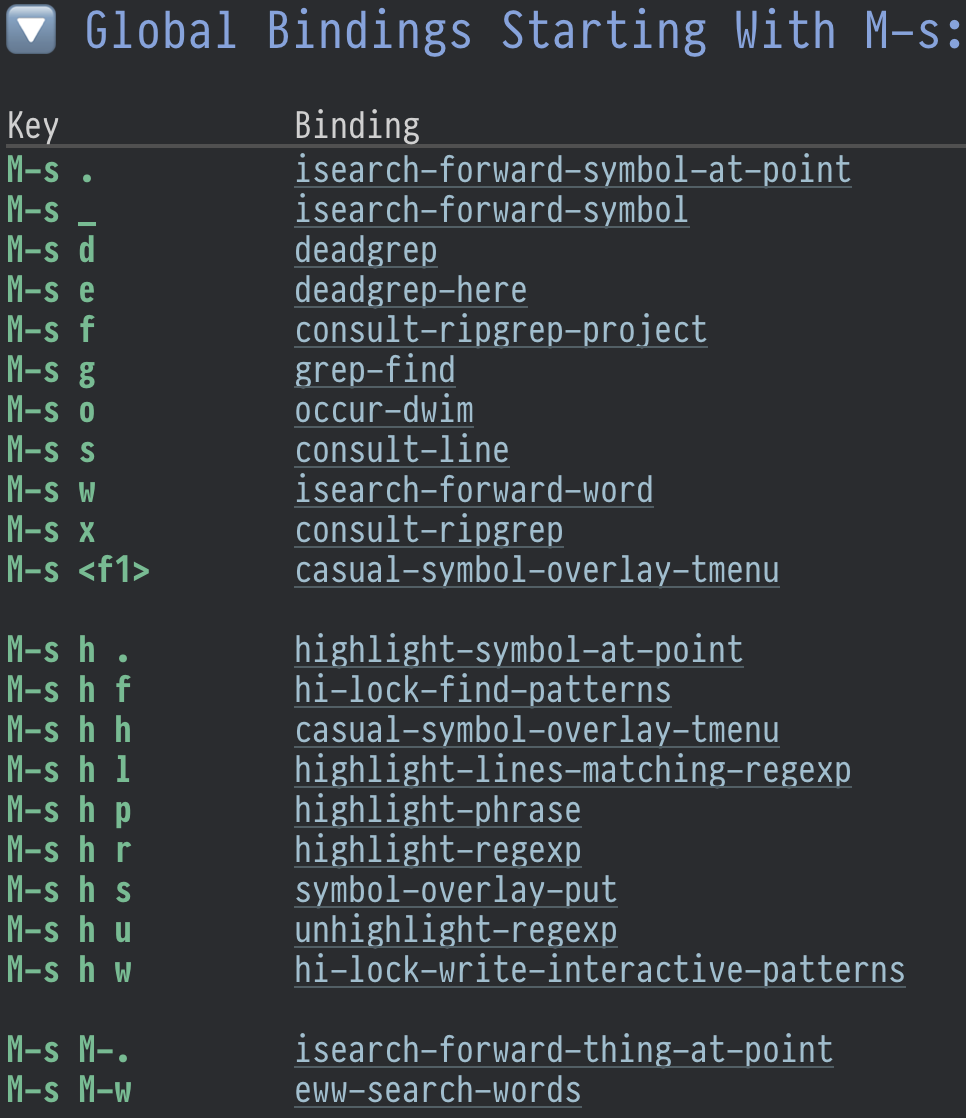
M-s is for Search

M-s is an entrypoint to search-related things. 95% of the time I use M-s d (deadgrep) and M-s o (occur).

M-s d runs deadgrep, a frontend for ripgrep for searching in the current project. I use it all the time, and nowadays with rise of LLM, making your project greppable is must have to enable AI to do sensible changes in the project.

M-s o is mighty M-x occur, but adjusted to "do what I mean" semantics – if selection is active, it runs "occur" on it, otherwise prompts for input.

(use-package emacs
  :config
  (defun occur-dwim (&optional _)
    "Run occur with Active Region if any, otherwise regular occur."
    (interactive)
    (if (use-region-p)
        (occur (buffer-substring-no-properties (region-beginning) (region-end)))
      (call-interactively 'occur)))
  (keymap-global-set "M-s o" #'occur-dwim))

M-s h is highlighing prefix, which deserves a separate post. So see you later, cheers!

m-s-prefix-in-emacs.png

Trying gptel-quick

karthink/gptel-quick is an Emacs Package to do quick LLM lookups of selected region.

On <2025-06-12 Thu> I installed it using this snippet:

(use-package gptel-quick :ensure t
  :vc (:url "https://github.com/karthink/gptel-quick" :branch "master")
  :bind (("C-c j l" . gptel-quick)))

Now, when I select a region and press {C-c j l}, gptel-quick opens a posframe at point with short explaination of the term. Works well, akin to built-in macOS feature "Lookup", but powered by LLM hense can give context-aware answers.

Check videos in karthink/gptel-quick, they are good.

AI digest, June 2025

On <2025-06-11 Wed> I stumbled upon several articles on LLM I want to read later.