Daisy' (Anthropic Claude Code engineer) workflow
On <2026-08-23 Sun> I read in stumbled on this post - Anthropic: Please Have Daisy the CC Engineer Do a Video! : r/ClaudeAI.
In this week's newsletter, Anthropic included this:
"My daily driver currently looks like: two lead agents that keep each other accountable and restart the other if either fails. These delegate to tech lead or PM agents for the 8-10 projects I'm running at any one time, and each project has 5-10 IC [individual contributor] agents, generalists or specialists depending on the problem. Across all of these I'm still only doing 30-50 prompts per day, and my IC agents typically work autonomously for 2-3 days. About 60% of my interaction is with the leads, 35% with a project lead, and 5% is when something has gone off the rails. All of these agents communicate directly with the SendMessage tool."
– Daisy, Engineer on Claude Code
Turning it into mindmap:
                                      ╭─ keep each other accountable
                   ╭─ two lead agents ┼─ restart the other if either fails
                   │                  ╰─ delegate to ┬─ tech lead ── 8-10 projects...
                   │                                 ╰─ PM agents
                   │                                                 ╭─ . ┬─ generalists
« Daisy workflow » ┼─ 8-10 projects ── per project ── 5-10 IC agents ┤    ╰─ specialists
                   │                                                 ╰─ work autonomously ── for 2-3 days
                   │                        ╭─ 60% with leads
                   ├─ 30-50 prompts per day ┼─ 35% with project lead
                   │                        ╰─ 5% off rails
                   ╰─ agents communicate ── SendMessage tool
My thoughts:
Why two lead agents? Likely they both run "/loop 30m check projects" with offset, so one is checking status while another is ready for communication. This is where "60% with leads" coming from; sometimes they both are checking, and Daisy goes to project leads directly. Those two leads have permanent session names and never closing.
8-10 projects. I also have about the same number of big topics a week, often carried to other weeks. So this sounds like the right amount of parallelism. Also keeping 8-10 projects on track is within cognitive abilities of an average human.
Beyond the basics with Claude Code
Comments lead to this video:
- YT
- Beyond the basics with Claude Code - YouTube
- author
- Daisy Hollman
- date
- <2026-05-22 Fri>
It breaks down to this mindmap:
                                          ╭─ Slack
                 ╭─ where work comes from ┼─ CI/CD ── no point to fix CI/CD manually
                 │                        ├─ Dashboards
                 │                        ╰─ Internal Docs
                 ├─ tip ── try doing ALL work from within CC
                 │         ╭─ code conventions are not in the model
                 ├─ limits ┼─ fine-tuning doesn't work well ── leads to more hallucinations
                 │         ╰─ in-context learning ── ICL ── general AI wins over specific AIs
                 │                                                         ╭─ rigid templates
                 │                     ╭─ compensates lack of intelligence ┼─ guardrails
                 │                     │                                   ├─ "don't let it touch X"
                 ├─ two kinds of tools ┤                                   ╰─ gets less useful as model improves
                 │                     │                           ╭─ more access
                 │                     ╰─ scales with intelligence ┼─ more control
                 │                                                 ├─ faster feedback loops
                 │                                                 ╰─ gets more useful as model improves
                 │                          ╭─ context window stayed at 1M max ── models are way better yoy
                 │                          ├─ can't dump the whole X into context ── X ┬─ wiki
                 ├─ context window is a box ┤                                           ╰─ codebase
                 │                          ├─ example ── try to run npm on Arduino
                 │                          ╰─ don't pay for what you don't use ── [TK: no slop skills]
                 │           ╭─ cached tokens are cheap ── new are expensive
                 │           ├─ not an LRU problem
                 ├─ KV cache ┼─ change in early instructions invalidates the cache ┬─ add new tool
                 │           │                                                     ╰─ change in CLAUDE.md
                 │           ╰─ put stable stuff at the front ── volatile at the end ── CC teams tries to solve this problem
                 ├─ Large-scale Software Engineering ── main question ── Does it scale?
                 │                           ╭─ when it's the right tool?
                 │                           ├─ CC has a shell ── Skill+CLI has less overhead
                 │                           │                                 ╭─ name
                 │                    ╭─ MCP ┼─ tools definitions sit in front ┼─ arguments
                 │                    │      │                                 ╰─ description
« Agentic flow » ┤                    │      │              ╭─ puts just name in the system prompt
                 │                    │      ╰─ tool search ┼─ kind-of lazy-loaded
                 │                    │                     ╰─ needs to be very specific ── e.g. slack
                 │                    │         ╭─ in-context
                 │                    │         ├─ one-line description always loaded
                 │                    │         ├─ full SKILL.md and assets loaded on-demand
                 ├─ Plugin primitives ┼─ Skills ┤                 ╭─ body is pay-per-use ── good
                 │                    │         ╰─ does it scale? ┼─ reliably loading requires a paragraph in description
                 │                    │                           ╰─ not possible to lazy-load sub-skills ┬─ no hierarchy yet
                 │                    │                                                                   ╰─ what if 100k skills?
                 │                    ├─ Hooks ┬─ runs code on events ── shell scripts
                 │                    │        ╰─ zero-overhead abstraction
                 │                    │         ╭─ out-of-context ── fundamental difference to a skill
                 │                    │         │               ╭─ named role
                 │                    │         ├─ more Claudes ┼─ own system prompt
                 │                    ╰─ Agents ┤               ╰─ own tool set
                 │                              ├─ spawned with a task ┬─ returns result
                 │                              │                      ╰─ its transcript doesn't come back
                 │                              ╰─ description still in-context ── what if 100k agents?
                 │                             ╭─ loads fully unconditionally ┬─ doesn't scale
                 │                ╭─ CLAUDE.md ┤                              ╰─ every plugin adds it
                 ├─ Doesn't scale ┤            ╰─ better inject via SessionStart hook
                 │                │         ╭─ low-quality ── low-cost ── useful, different contract
                 │                ╰─ Memory ┼─ model-curated, not human-curated
                 │                          ╰─ plugins are human-authored, human-reviewed
                 │                 ╭─ worktrees ┬─ one repo ── N claudes each owns its branch
                 │                 │            ╰─ better make it long-lived ── less overhead ── [TK: try kunchenguid/treehouse?]
                 ├─ Multi-clauding ┼─ asynchrony ┬─ walk away, let it do the work
                 │                 │             ╰─ /loop 10m
                 │                 ├─ parallelism ── multiple of asynchrony
                 │                 ╰─ lot's of context switching
                 ╰─ Agent-teams ┬─ teammates ── long-lived ── unlike agents
                                ╰─ SendMessage tool ── Claude's talking to each other
Follow-up questions:
- Do I need claude-mem?
reddigg extensions: reddigg-rss and reddigg-images-to-html
In Update Reddigg is now a fullblown reddit client : r/emacs the reddigg.el author, u/Goator, asked me to share extensions I've (well, Claude Code) written for reddigg. Sharing.
- reddigg-rss
- advice reddigg to use RSS feed instead of json as Reddit blocked the latter
- reddigg-images-to-html
- create standalone HTML with all the images from current view in masonry grid
Here's my reddigg configuration block:
(use-package reddigg
  :config
  (require 'reddigg-images-to-html)
  (require 'reddigg-rss))
Add buffer name autocomplete to cape
I use cape.el to manage specific completion-at-point functions. The most used ones for me are {C-c t f} - complete file name and {C-c t s} - complete Elisp symbol.
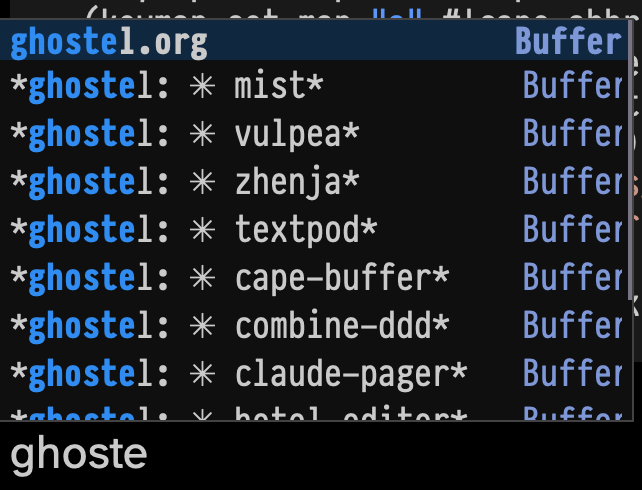
After starting using ghostel with Claude Code being able to complete the buffer name became more desirable than ever, so I can quickly drop into notes things like this:
- (vux-ghostel-buffer "cape-buffer")
Asked Claude, it wrote "cape-buffer-name" function, bound to {C-c t b}. Works!
(defun cape-buffer-name ()
  "Completion-at-point function for open buffer names."
  (let ((bounds (or (bounds-of-thing-at-point 'symbol)
                    (cons (point) (point)))))
    (list (car bounds) (cdr bounds)
          (completion-table-dynamic
           (lambda (_) (mapcar #'buffer-name (buffer-list))))
          :exclusive 'no
          :annotation-function (lambda (_) " Buffer"))))

(use-package cape
  :after (tempo)
  :config
  (setq cape-elisp-symbol-wrapper '())
  (setq cape-keymap (make-sparse-keymap))
  (let ((map cape-keymap))
    (keymap-set map "<tab>" #'completion-at-point)
    (keymap-set map "b" (lambda () (interactive)
                          (cape-interactive #'cape-buffer-name)))
    ;; (keymap-set map "t" #'complete-tag)
    (keymap-set map "t" #'tempo-complete-tag)
    (keymap-set map "d" #'cape-dabbrev)
    (keymap-set map "f" #'cape-file) ;; using often
    (keymap-set map "k" #'cape-keyword)
    (keymap-set map "s" #'cape-elisp-symbol) ;; using often
    (keymap-set map "a" #'cape-abbrev)
    (keymap-set map "l" #'cape-line)
    (keymap-set map "w" #'cape-dict)
    (keymap-set map "_" #'cape-tex)
    ;; (keymap-set map "&" #'cape-sgml)
    ;; (keymap-set map "r" #'cape-rfc1345)
    t)
  (keymap-global-set "C-c t" cape-keymap))
Screenshot:
Create Graphviz graph out of a picture
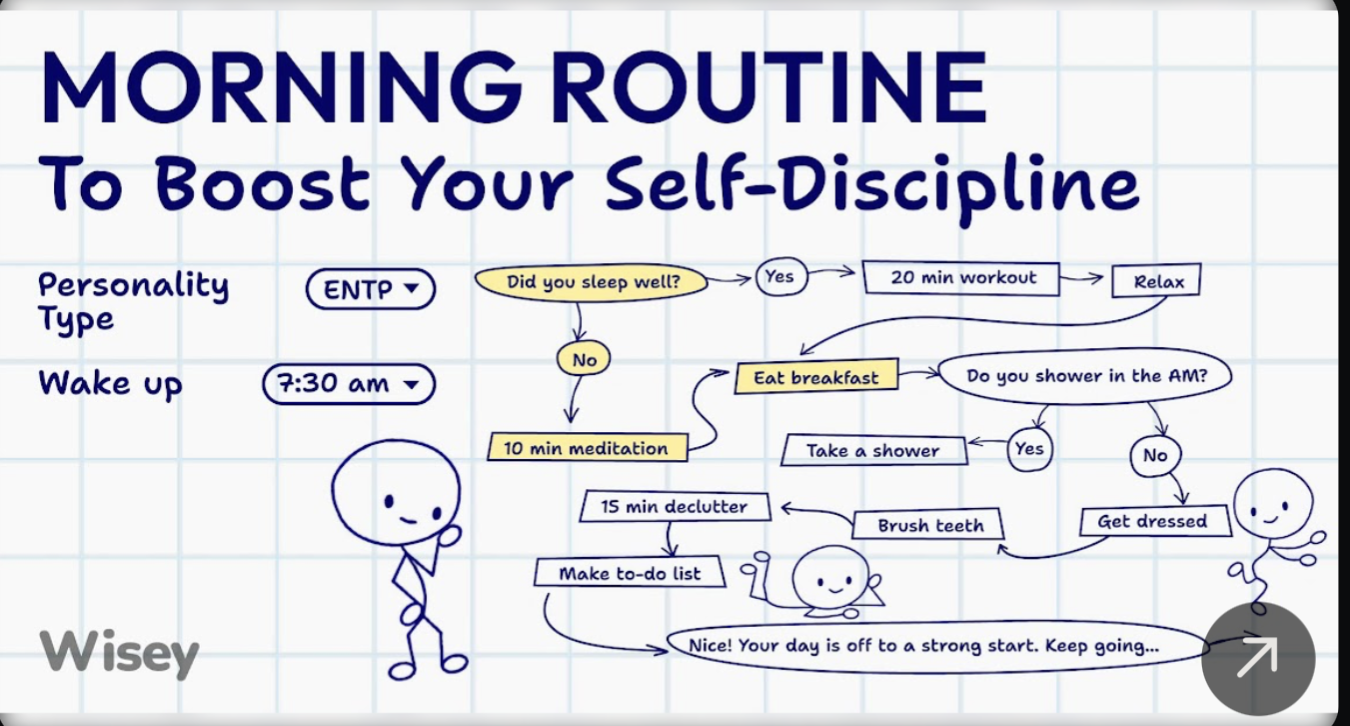
I was cleaning my screenshots directory and spotted one from the "Wisey" service that teaches you mindfullness and habits. I didn't go to subscribe to the service but I did save the screenshot.
I asked Claude Code: I want Graphviz graph that looks as close as possible to this file:
And here's the result I got in a minute:
(vux-ghostel-buffer "graphviz-morning-routine")
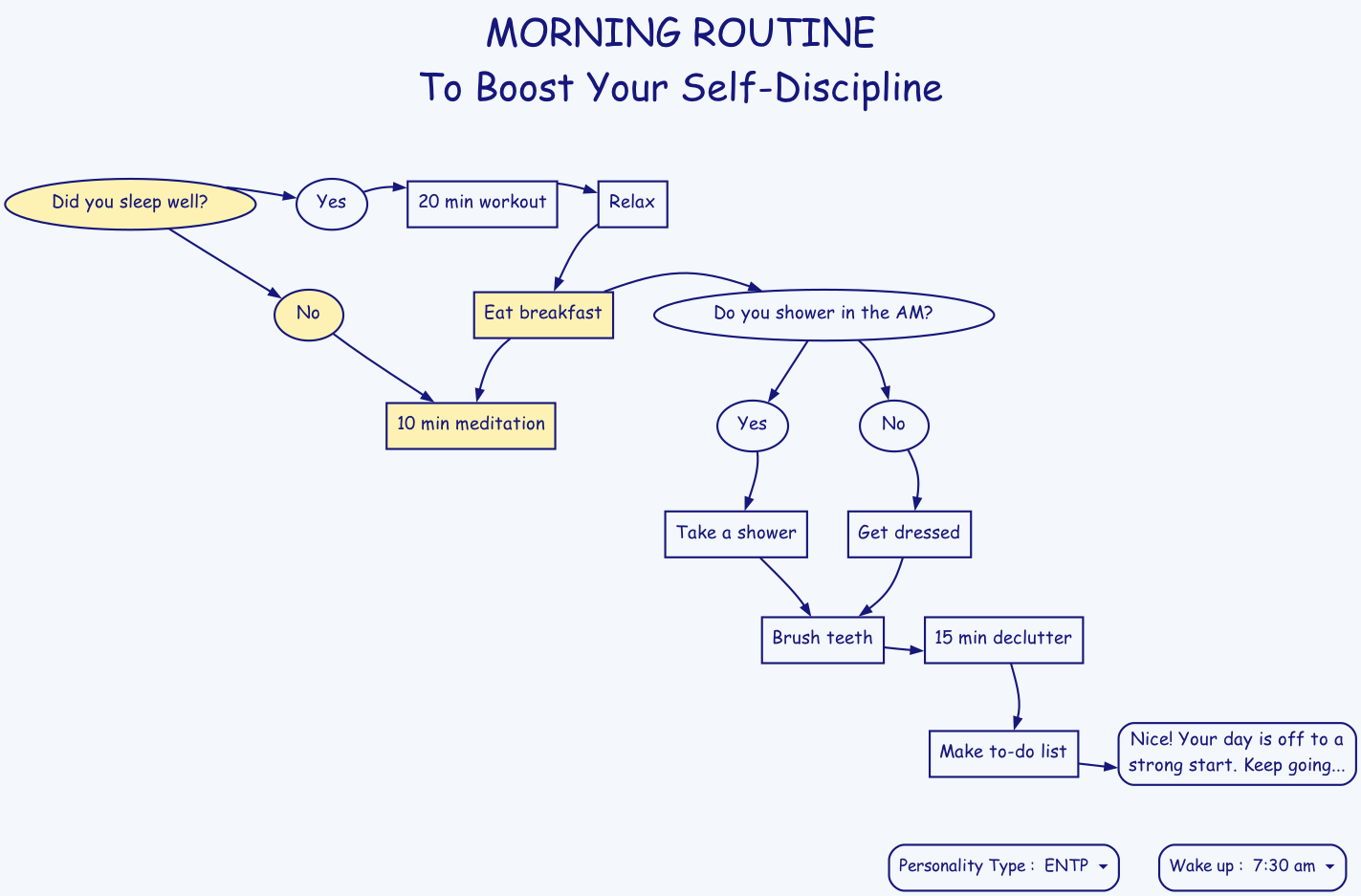
Not bad, huh?
claude-pager
On <2026-06-03 Wed> I somehow bumped into idea to use emacsclient as EDITOR in Claude Code.
Turns out CC respects EDITOR env variable, either from environment or configured in ~/.claude/settings.json:
{"env": {"EDITOR": "emacsclient", "VISUAL": "emacsclient"}}
Even if [Feature Request] Allow configuring external editor for Ctrl-G prompt editing · Issue #18990 · anthropics/claude-code is still in open.
In that issue I spotted this project: gradigit/claude-pager. Fast C transcript pager for Claude Code: no blank Ctrl-G screen, clickable links/files, queued prompt composer. And its sister editor: gradigit/turbodraft.
Tried both. Turbodraft - I don't need another text editor rather than Emacs, so skipping it. But claude-pager looks useful, so I forked it.
First, I wired Emacs into claude-pager; so that it renders transcripts in both CC screen when it waits for the prompt + adds it to Emacs temporary buffer.
This mostly solves clunkiness of copying from claude terminal into Emacs and back - now I press {C-g} in claude and continue editing in Emacs.
Related to Agent SDK billing and parting ways with agent-shell.
This is how my env block looks like in ~/.claude/settings.json.
{
  "env": {
    "EDITOR": "/Users/pavel/.velppa/claude-pager/bin/claude-pager-open",
    "CLAUDE_PAGER_EDITOR": "/Users/pavel/.velppa/claude-pager/emacs/claude-emacs-prompt",
    "CLAUDE_PAGER_EDITOR_TYPE": "gui"
  }
}
{C-g} in claude opens claude-pager-open that generates transcript and pastes it into both terminal and to the temp file to edit in Emacs, then runs claude-emacs-prompt shell file that calls elisp file which loads into the buffer, assigns keybindings etc.
Setup involves adding hooks:
SessionStart hook:
     26:            "command": "/Users/pavel/.velppa/claude-pager/shim/save-session-transcript.sh"
Then I rewrote the binary from C to Zig. Rewrite used Superpowers to develop a spec first, then launch a series of agents. It took 4+ hours for CC to finish rewrite, it was ready in the morning. It used all extra usage (42 EUR) in fast mode in first 20 minutes.
7000 loc in C => ??? in Zig.
Now I understand the C well.
Another interesting project from the same author:
- gradigit/confetti - Lightweight confetti animation for macOS — fire colorful confetti from your screen corners
Copy buffer-name with easy-kill
easy-kill Emacs package allows killing multiple things, switching between them on the fly. I use it to quickly grab the buffer-file-name (full path or file name only), using {M-w b}.
- github
- leoliu/easy-kill
Keybindings:
- {M-w} without active region
- copy current line, same as {x y} in meow-normal-mode
- {M-w C-w} without active region
- kill current line, same as {x s} in meow-normal-mode
- {M-w b}
- copy current full path to buffer-file-name
- {M-w b 0}
- copy current buffer-file-name
- {M-w b -}
- copy current directory
On <2026-06-04 Thu> I added {M-w B} to copy current buffer-name, useful to paste into Claude Code (running under ghostel for me).
Here's the configuration block:
(use-package easy-kill
  :config
  (keymap-global-set "<remap> <kill-ring-save>" #'easy-kill)
  (defun easy-kill-on-buffer-name (_n)
    "Get current `buffer-name'."
    (if (easy-kill-get mark)
        (easy-kill-echo "Not supported in `easy-mark'")
      (easy-kill-adjust-candidate 'buffer-name (buffer-name))))
  (add-to-list 'easy-kill-alist '(?B buffer-name)))
- Define function
easy-kill-on-buffer-name. - Add binding to 'easy-kill-alist.
New agent skill – youtube-monitor
Below is the content of ~/.claude/skills/youtube-monitor/SKILL.md that I fully wrote myself. You can see results by searching for YouTube tag. I added a Claude Routine to run this skill daily. Let's see how it would work.
---
name: youtube-monitor
description: Monitor and summarize new YouTube videos from channels I follow.
compatibility: Requires curl and network access.
allowed-tools: Bash WebSearch
---

## Instructions

### Step 1: Identify channells that I follow

Check `elfeed-feeds` variable in Emacs (via `emacsclient`), filter YouTube
channels.

### Step 2: Find latest videos using /youtube-finder skill

Exclude shorts.

### Step 3: Find new videos that were not yet summarized

Run this shell command, providing correct user handle of the channel:

```sh
cat ~/Notes/youtube_summaries.org | grep -E '(<handle>)' -A5 | head -n 10
```

In results will be the last summarized video, all videos after that are new.

### Step 4: Summarize each new video

Summarize each new video using /youtube-summarizer skill, write new
summary to ~/Notes/youtube_summaries.org file as the first heading,
using this template:

```org-mode
* <title of the video> – <name> (<handle>)   YouTube
:PROPERTIES:
URL <url of the video>
DURATION <MM:SS>
PUBLISHED <YYYY-MM-DD DOW>
END
- <url of the video>

<abstract>

/summary generated by my "YouTube summarizer" AI skill./

<full summary, if using subheadings, only H2 are allowed>
```
caveman
- github
- JuliusBrussee/caveman
- HN
- Caveman: Why use many token when few token do trick | Hacker News
- YouTube
- No way this actually works - YouTube - ThePrimeTime
Why use many token when few token do trick — Claude Code skill that cuts 65% of tokens by talking like caveman.
I tried it on <2026-04-11 Sat> on Mac Mini 2024 and on Mac Book Pro M1.
claude plugin marketplace add JuliusBrussee/caveman && claude plugin install caveman@caveman
claude plugin uninstall caveman@caveman && claude plugin marketplace remove caveman
Uninstalled after reading HN comments. Installed again recently.
Caveman in gptel
Add caveman as a gptel directive:
(setq gptel-directives
      (cons '(caveman . "CAVEMAN MODE: Drop articles/filler/pleasantries/hedging. Fragments OK. Short synonyms. Pattern: [thing] [action] [reason]. [next step]. Keep full technical accuracy. Code unchanged.")
            gptel-directives))
Select with C-c C-d in gptel buffer.
HN comments summary
A developer created "Caveman," a Claude Code skill that forces the AI to respond in simplified, caveman-like language to reduce token usage by approximately 75%. The author clarifies this is mostly a joke and targets visible output (removing preambles and filler text), not the hidden "thinking" tokens that improve performance. They acknowledge the ~75% claim needs proper benchmarking and note that the skill doesn't affect code quality itself.
The Hacker News community is highly skeptical, with many arguing that tokens are "units of thinking" for LLMs—reducing them could make the model dumber by limiting its reasoning capacity. Critics point out that chain-of-thought reasoning requires verbose output, and forcing concise responses may degrade performance. However, some find the concept useful for cutting through verbose AI responses, comparing it to telegram-style communication or noting that similar concise prompting can work without harming quality for simple tasks. The debate centers on whether this actually saves meaningful costs versus potentially sacrificing accuracy.
visit-source.el
visit-source.el is an utility Emacs package to quickly go to a file at
point (under cursor). I bind (keymap-global-set "H-RET"
#'visit-sourse) and can quickly go to files with line precision from
anywhere, including log outputs.
Installation
grab a file visit-source.el, put it somewhere on load-path, bind to a
key – I have it within ffap package:
(use-package ffap :ensure nil
  :config
  (require 'visit-source)
  ;;(setq ffap-file-finder #'visit-source)
  (setq ffap-file-finder #'find-file)
  :bind (("H-<return>" . visit-source)))
Usage
In any buffer put a point on a file-looking string and call {M-x visit-source RET} (or {H-<return>} for me).
File-looking string can be:
- a filename
- a filename with lines (as in exception or log output)
History
When I first find it on r/emacs comment, it was much simpler version
and was intended as drop-in replacement for find-file. Then I added
project awareness, so you can visit-source on a file
Pavels-Emacs-Configuration-v3.org by filename, from anywhere in the
project.
Initially I adopted visit-source instead of find-file {C-x C-f} but
then switched to find-file-at-point that has a bit different semantics
and kept visit-source at {H-RET} separately.
visit-source v0.3.0
visit-source worked in most cases, but still had some rough edges,
like didn't parse when path at point ends with dots, so text like
../Pavels-Emacs-Configuration-v3.org. didn't parse, so I had to
manually end sentences with "../Pavels-Emacs-Configuration-v3.org
file." or "../nv directory." Yesterday I bumped into the need to
visit arbitrary Org Mode link. {C-c C-o} runs OS open on it, so log
files were opening with TextEdit.app for me. Surely I can reconfigure
it in macOS level to associate Emacs with log files (via UI?); but
visit-source looks the way for it.
Given personal tooling reneissance, with Claude Code on <2026-05-06 Wed> I asked it to refactor the code - extract helper pure functions, implement fixes, support Org Mode links, get rid of trailing punctuation, add tests.
So meet visit-source v0.3.0 – visit-source.el!
terraform-ts-mode
At work I work with Terraform, so need to edit quite a lot of tf files in GNU Emacs. There's no built-in terraform-ts-mode Emacs package and I don't want to install regexp-based terraform-mode package
Existing terraform-ts-mode is this: kgrotel/terraform-ts-mode, which claims being experimental. So it's a good opportunity to learn how to create major modes using Tree Sitter and on <2026-05-05 Tue> I built my own with Claude Code.
Installation: put terraform-ts-mode.el to load-path.
Usage:
(use-package terraform-ts-mode :ensure nil
  :init
  (add-to-list 'major-mode-remap-alist '(terraform-mode . terraform-ts-mode)))
With this knowledge, the next step is [TK: try mickeynp/combobulate package].