use role content_dbt_prod;
use schema content.content_prod;
alter table content.content_prod.place rename to place_hco;
create view content.content_prod.place as select * from content.content_prod.place_spark;
Content Squad announcement:
Old content.content_prod.place table (HCO-based) has been renamed and considered private
Datadog renamed Case Management to Work Management
We use Datadog Case Management at $WORK for managing failed batch
jobs. When a job fails, it sends event to EventBridge then to Datadog
Events, then a Monitor captures and opens a new case, providing all
the details of failure (links, names, timing, basically what comes in
the event). Automation workflow archives duplicated active case by
title, so sequential daily runs only lead to the first case. Works
really well, about 4000 cases have been created in the last 6 month of
usage. AI agents are checking open cases on schedule and do root
cause analysis and resolve cases (open PRs with fixes)
semi-autonomously (Claude became lazy recently).
Today I noticed that Datadog renamed Case Management to Work
Management, and it changes premise quite a lot. Do you remember Slack
mission "Slack - where work happens" - well, often it's true, but when
it is true, it means somebody doesn't do their real work. If we have
a product "Work Management", then, well, why don't we use it to manage
work, and manage work in Slack/Notion/Shortcut/Github. Fifth place to
manage work. Thank you very much, dear Datadog, you went from a
strong concept of a funnel – Alert → Case → Incident – into vague
"Work Management"
Case Management API has been always not pleasant: heavy relying on
UUIDs, lack of public API methods - can't link cases, can't READ
COMMENTS - yes, you can POST a comment, but you can't read it back. To
overcome these limitations, I had to check what Datadog UI is doing and wrap
it into datadog-mcp-server.
What has changed in the API side of things with this renaming?
Absolutely nothing, Work Management doesn't exist nor in API reference
nor in the API requests, they still go to
https://app.datadoghq.com/api/v2/cases.
I'm using Handy.app (cjpais/Handy) for text-to-speech and
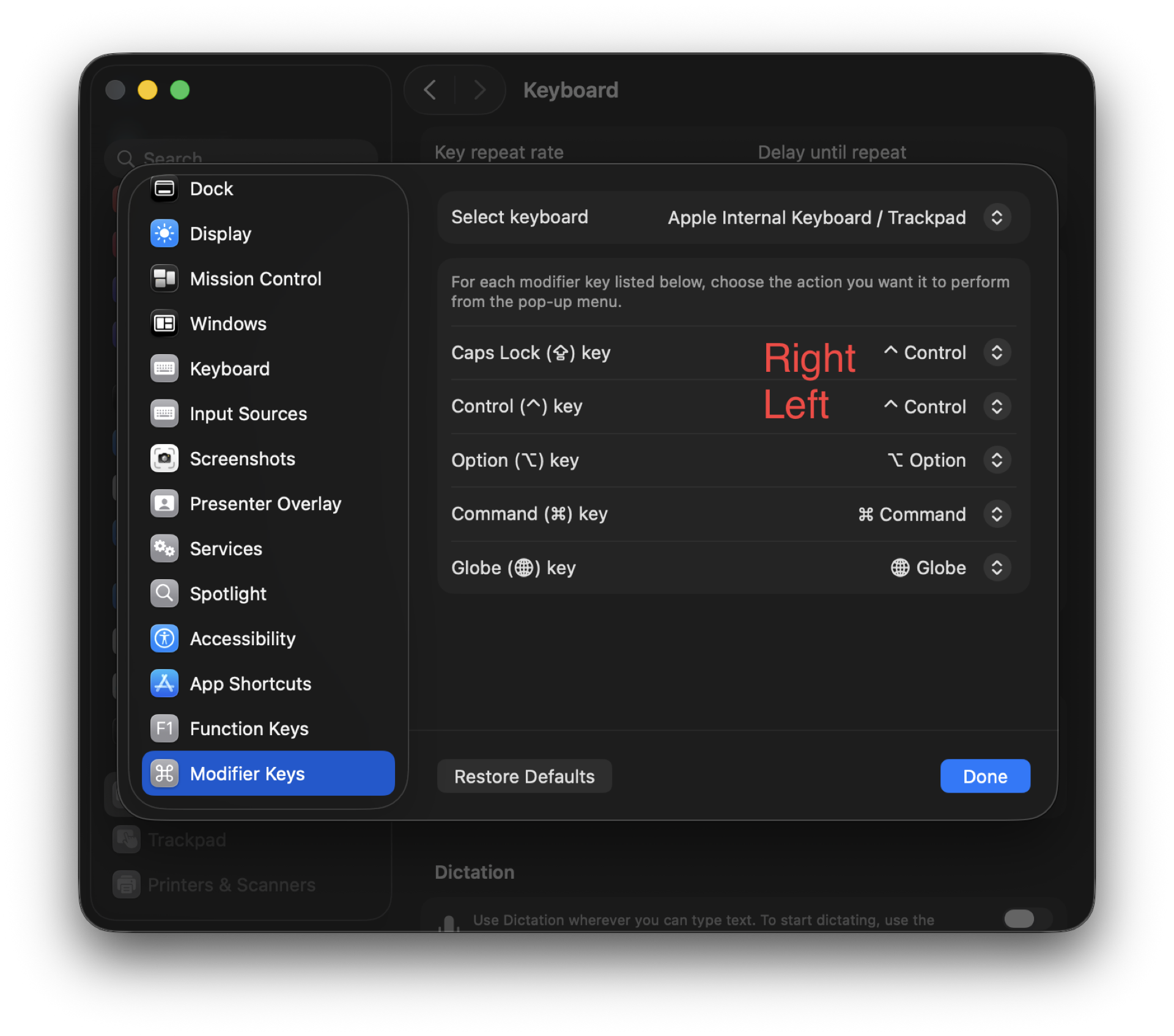
hold-to-speak functionality. Which button to use? Right Option
rarely used, but I do use it as Hyper key in Emacs, in particular
{H-RET} calls visit-source (visit-source.el).
Right Control also rarely used and does exists on my Keyboardio Model
100. But, it turned out macOS remaps CapsLock to Right Control
from the SystemSettings.app.
I need some remapping then, for internal keyboard only:
CapsLock to Left Control
Left Control to Right Control
To achieve that, store the plist to ~/Library/LaunchAgents/com.local.keyboard-remap.plist file.
To rebind live without reboot, run hidutil commands manually. In SystemSettings.app
set default CapsLock binding (CapsLock to CapsLock).
In that issue I spotted this project: gradigit/claude-pager. Fast C
transcript pager for Claude Code: no blank Ctrl-G screen, clickable
links/files, queued prompt composer. And its sister editor: gradigit/turbodraft.
Tried both. Turbodraft - I don't need another text editor rather than Emacs,
so skipping it. But claude-pager looks useful, so I forked it.
First, I wired Emacs into claude-pager; so that it renders transcripts
in both CC screen when it waits for the prompt + adds it to Emacs temporary
buffer.
This mostly solves clunkiness of copying from claude terminal into Emacs and
back - now I press {C-g} in claude and continue editing in Emacs.
{C-g} in claude opens claude-pager-open that generates transcript
and pastes it into both terminal and to the temp file to edit in Emacs,
then runs claude-emacs-prompt shell file that calls elisp file which
loads into the buffer, assigns keybindings etc.
Then I rewrote the binary from C to Zig. Rewrite used Superpowers to
develop a spec first, then launch a series of agents. It took 4+
hours for CC to finish rewrite, it was ready in the morning. It used
all extra usage (42 EUR) in fast mode in first 20 minutes.
7000 loc in C => ??? in Zig.
Now I understand the C well.
Another interesting project from the same author:
gradigit/confetti - Lightweight confetti animation for macOS — fire
colorful confetti from your screen corners
Copy buffer-name with easy-kill
easy-kill Emacs package allows killing multiple things, switching
between them on the fly. I use it to quickly grab the
buffer-file-name (full path or file name only), using {M-w b}.
claude plugin marketplace add JuliusBrussee/caveman && claude plugin install caveman@caveman
claude plugin uninstall caveman@caveman && claude plugin marketplace remove caveman
Uninstalled after reading HN comments. Installed again recently.
Caveman in gptel
Add caveman as a gptel directive:
(setq gptel-directives
      (cons '(caveman . "CAVEMAN MODE: Drop articles/filler/pleasantries/hedging. Fragments OK. Short synonyms. Pattern: [thing] [action] [reason]. [next step]. Keep full technical accuracy. Code unchanged.")
            gptel-directives))
Select with C-c C-d in gptel buffer.
HN comments summary
A developer created "Caveman," a Claude Code skill that forces the AI
to respond in simplified, caveman-like language to reduce token usage
by approximately 75%. The author clarifies this is mostly a joke and
targets visible output (removing preambles and filler text), not the
hidden "thinking" tokens that improve performance. They acknowledge
the ~75% claim needs proper benchmarking and note that the skill
doesn't affect code quality itself.
The Hacker News community is highly skeptical, with many arguing that
tokens are "units of thinking" for LLMs—reducing them could make the
model dumber by limiting its reasoning capacity. Critics point out
that chain-of-thought reasoning requires verbose output, and forcing
concise responses may degrade performance. However, some find the
concept useful for cutting through verbose AI responses, comparing it
to telegram-style communication or noting that similar concise
prompting can work without harming quality for simple tasks. The
debate centers on whether this actually saves meaningful costs versus
potentially sacrificing accuracy.
SafariTabs.app v0.2.0
On <2026-05-07 Thu> I do several improvements to SafariTabs.app.
Dragging swimlanes, so I can rearrange them to follow Spaces 3, 4, 5.
Auto-sized swimlanes: each column takes 1/3 of the app window,
capped at 1/6 of the current display — so a half-screen window
always fits 3 columns and a maximised one fits 6, on any
resolution.